Note
Click here to download the full example code
Univariate amputation
This example demonstrates different ways to amputate a dataset in an univariate manner.
# Author: G. Lemaitre
# License: BSD 3 clause
import sklearn
import seaborn as sns

sklearn.set_config(display="diagram")
sns.set_context("poster")
Let’s create a synthetic dataset composed of 10 features. The idea will be to amputate some of the observations with different strategies.
import pandas as pd
from sklearn.datasets import make_classification

X, y = make_classification(n_samples=10_000, n_features=10, random_state=42)

feature_names = [f"Features #{i}" for i in range(X.shape[1])]
X = pd.DataFrame(X, columns=feature_names)
Missing completely at random (MCAR)
We will show how to amputate the dataset using a MCAR strategy. Thus, we will amputate 3 given features randomly selected.
import numpy as np

rng = np.random.default_rng(42)
n_features_with_missing_values = 3
features_with_missing_values = rng.choice(
    feature_names, size=n_features_with_missing_values, replace=False
)
Now that we selected the features to be amputated, we can create an transformer that can amputate the dataset.
from ampute import UnivariateAmputer

amputer = UnivariateAmputer(
    strategy="mcar",
    subset=features_with_missing_values,
    ratio_missingness=[0.2, 0.3, 0.4],
)
If we want to amputate the full-dataset, we can directly use the instance
of UnivariateAmputer as a callable.
X_missing = amputer(X)
X_missing.head()
We can quickly check if we get the expected amount of missing values for the amputated features.
import matplotlib.pyplot as plt

ax = X_missing[features_with_missing_values].isna().mean().plot.barh()
ax.set_title("Proportion of missing values")
plt.tight_layout()
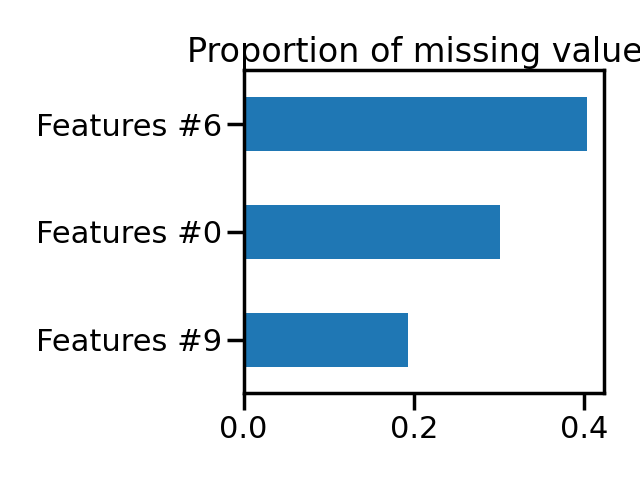
Thus we see that we have the expected amount of missing values for the selected features.
Now, we can show how to amputate a dataset as part of the scikit-learn
Pipeline.
from sklearn.impute import SimpleImputer
from sklearn.preprocessing import StandardScaler
from sklearn.linear_model import LogisticRegression
from sklearn.pipeline import make_pipeline
from sklearn.model_selection import cross_val_score
from sklearn.model_selection import ShuffleSplit

model = make_pipeline(
    amputer,
    StandardScaler(),
    SimpleImputer(strategy="mean"),
    LogisticRegression(),
)
model
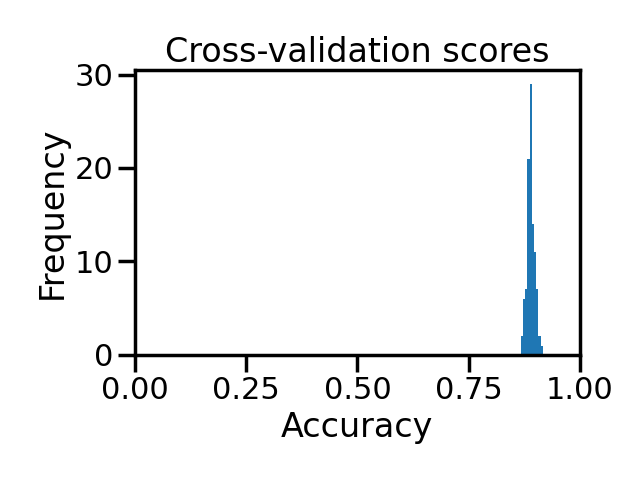
Now that we have our pipeline, we can evaluate it as usual with any
cross-validation tools provided by scikit-learn.
ax = results.plot.hist()
ax.set_xlim([0, 1])
ax.set_xlabel("Accuracy")
ax.set_title("Cross-validation scores")
plt.tight_layout()
Total running time of the script: ( 0 minutes 4.324 seconds)